Daily OVR
Developed by TM xR Lab
Published by TM xR Lab
Available on:
Genres:
Community Reviews
🔒 Professional Analytics
Get detailed market data, player sentiment analysis, competitive insights, and more.
About This Game
Before you buy
- Daily OVR doesn't support games that only run on Oculus SDK. Don't buy it if you only want to use it to play games that you bought on Oculus Store.
What is Daily OVR?
Do you want to use your desktop/window apps during VR gameplay? For example, you can play VRChat and see your Twitch chat window. Daily OVR is the best SteamVR Overlay(OVR) solution! And it supports Oculus, Vive/Viveport/Cosmos/MR(Mixed Reality)/Index!
Why do you need Daily OVR?
How many times have you wanted to check your Twitch chat room or watch a Youtube video while playing a VR game? Do you feel that most VR Overlay tools in the market are too tricky to set up, you want to have a relatively easy way to use? Overlays in the market now have default buttons that conflict with your favorite game, so you can't enjoy it? Daily OVR can help you solve these problems. We have been working on developing the Overlay tool that users like, which allows users to experience VR games and efficiently multitask at the same time. We have provided the Demo version for you to test. Don't doubt! Use it now!
Here is the beginner tutorial:
_,.-'~'-.,__,.-'~'-.,__,. Features .,__,.-'~'-.,__,.-'~'-.,_
- The most user-friendly OVR UI.
- Mirror your favorite Windows applications into VR game.
- Mirror the desktop or monitors.
- QuickSwitch let you quickly switch among programs.
- Save the frequently used settings to "My Favorites."
- Adjust the size, transparency, and placement of overlays and keep your settings for next time.
- Easily launch the virtual keyboard on the overlay toolbar.
- Overlay FPS adjustment on the overlay toolbar.
- Bind the overlay to different controllers or the HMD or HTC Vive trackers.

- Support Oculus & Windows MR & Index (through SteamVR)
- VR Phone Notification Pop-up.
Daily OVR allows you to bring your Android phone notification into the VR view; you won't miss important messages anymore.
- Phone calling notification
- SMS
- WhatsApp
- LINE - Support SteamVR 2.0 Input. (You can customize button settings yourself!)
- ML Object detection and display (Ex: keyboard, mouse, cat, dog, cup, person) (Note: Vive & Vive Pro only)
- A handy VR keyboard
- A Clock widget
You have to download Android app: Daily OVR to enable "Mobile phone notification."
Scan the QR code below and download Daily OVR app on Google Play now!

_,.-'~'-.,__,.-'~'-.,__,. FAQ .,__,.-'~'-.,__,.-'~'-.,_
Daily OVR doesn't work in some games. For example, Elite dangerous, PokerStarVR ...etc
The issue is caused by Elite Dangerous tries to run in Oculus SDK mode. Daily OVR doesn’t support Oculus SDK. So you have to do some works for forcing it to run in SteamVR mode.
You can follow the steps here:
How many overlays can I open?
It depends on your PC's performance. If performance is terrible, you could try:
- Close the overlays
- Set lower FPS value

The button mappings of controllers are not good. Can I change it?
Daily OVR supports SteamVR 2.0 Input. You can customize button settings yourself.
I don't like the big icon/logo! Can I make it disappear?
Yes, you can hide the icon by long-pressing a button. See below:

I cannot see/move my mouse pointer on some apps!
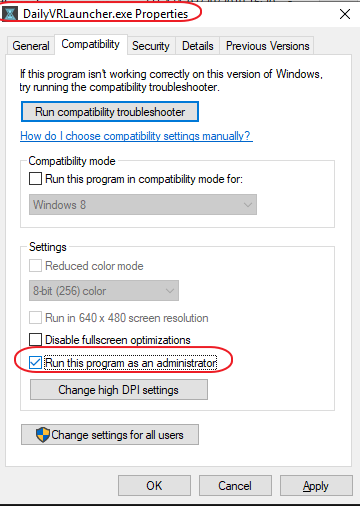
Some apps run as administrator permission. When Daily OVR doesn't run as the same permission, it cannot access to those apps.
You have to check "Run this program as an administrator" on DailyVRLauncher.exe Properties.
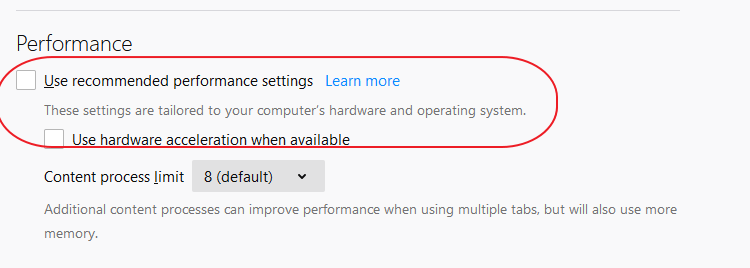
My Firefox screen is blank!
You have two options:
1. You have to disable the hardware acceleration of Firefox. See below:
2. Use CustomApp instead
Join Daily OVR Discord and share your feedback with us!
Here is Discord invitation link:
System Information
Age Rating
All Ages
You Might Also Like

A Hat in Time
A Hat in Time is a cute-as-heck 3D platformer featuring a little girl who stitches hats for wicked powers! Freely explore giant worlds and recover Time Pieces to travel to new heights!

Europa Universalis IV
Rule your land and dominate the world with unparalleled freedom, depth and historical accuracy. Write a new history of the world and build an empire for the ages.

The Precinct
Averno City, 1983. Gangs rule the streets and your father lies restless in his grave. Clean up the city, uncover the truth, and embark on thrilling vehicle chases through destructible environments in this neon-noir action sandbox police game.

Mechabellum
Mechabellum is a rewarding tactical wargame where you gain victory by adapting your strategy and outthinking your opponents. Command a mechanized army in battles against humans or AI, customize your units and strategically place them on the battlefield to watch them destroy your enemies.

Nine Sols
Nine Sols is a lore rich, hand-drawn 2D action-platformer featuring Sekiro-inspired deflection focused combat. Embark on a journey of eastern fantasy, explore the land once home to an ancient alien race, and follow a vengeful hero’s quest to slay the 9 Sols, formidable rulers of this forsaken realm.

Want Professional Game Market Data?
Access detailed analytics, player sentiment analysis, competitive insights, and market positioning data for Daily OVR and 150,000+ other games. Perfect for developers, publishers, and analysts.