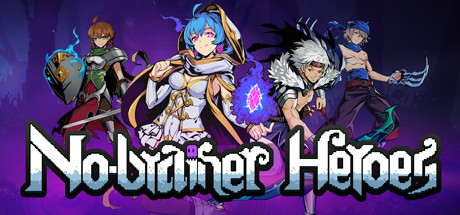
No-brainer Heroes
Developed by 橙光游戏
Published by 幻爵工作室
Available on:
Community Reviews
🔒 Professional Analytics
Get detailed market data, player sentiment analysis, competitive insights, and more.
About This Game
About game save
Game save path: C: \ Users \ {User Name} \ AppData \ Local \ DragonKiller \ Saved {} is the user name of the computer. If there is a problem with the save, please do not close the game and immediately save the backup because the savings will be saved after the game is closed.
Upload to steam cloud.
Added archive backup and automatic restore functions.
The file identified by bk1 is an automatic restoration file. When the archive is broken, it will be automatically restored without manual operation.
The file identified by bk2 is a manually restored file. When the automatic restoration fails, you can manually restore it by modifying the file name.
recovery method for Cloud Archive synchronization error
In order to avoid incorrect coverage of cloud archives caused by some unknown reasons.We have added a local restore method to the archive. If this situation happens, you can restore the archive to a local archive saved by your computer in the following ways.
1. Under the game's archive directory, find the "savegames" folder.
2. Enter "savegames" to find the file with the suffix "backup" corresponding to the archive file.
3. Delete the original archive file and change the suffix name of the corresponding ".backup" file to ".sav".
For example, if you want to restore the first archive to a local archive in endless mode by this way, you need to delete "HHH.sav" and change "HHH.backup" to "HHH.sav".
Direct3D 12 game crash handling
To solve the problem that Direct3D 12 causes the game to crash, you can try the following solutions:
1. Open the game root directory and find Game.exe;
2. Create a shortcut of Game.exe on the desktop;
3. Right-click the shortcut and click Properties;
4. Enter "-DX12" at the end of the ”Target” input box (there is a space in front of "-", don't forget);
5. Then start the game through a shortcut;
Boss key
Alt + D hides the game, Alt + W or CTRL + ALT + E calls out the game.
It may not work if the registry shortcuts conflict.
Close the boss key:
Paste the following content in the "Game.ini" file to close the boss key and it will take effect after restart.
[/script/game.dragonkillerconfig]
OpenBossKey = False
The "Game.ini" file path is as follows:
C: \ Users \ {username} \ AppData \ Local \ DragonKiller \ Saved \ Config \ WindowsNoEditor
({Username} is the user name of the computer)
About the Game
25 Heroes
Each hero has its own characteristics and playability, there have no weak heroes, only have the combinations you can't think of.
50 Treasures
Collect treasures! A reasonable mix of treasures will turn the adventurer into the dragon killer!
6 Dragons
Each dragon has the ultimate power. Defeat them and save the world!Game Features
·Many map chapters allow the player to choose, the player can choose different routes on each map, and different routes will have different heroes and treasures ,they are waiting for the player to collect.·Camp, market, equipment store, smithy, notice, businessman, clock tower. Diverse town management gameplay will help you to improve your team.·Rich and diverse random events,make your choice,get rewards or accept punishment.
·Rich hero skills. Understand the characteristics of each hero and learn skills based on their characteristics, it can perform up to their full capabilities.
·The match between heroes and treasures, heroes and heroes, treasures and treasures, give your strategy choices based on different levels.
·Brand new week gameplay. At the beginning of each adventure, you can choose different heroes, treasures and initial rewards.
Background story
Now swire black dragon has awoken, evil devil gas engulfed the land again. Countless lives can not resist the erosion of the devil gas, becomes demons. People struggling with Death and despair.As the lord of a town, can you gather the warriors scattered around, train them, and finally lead them to defeat the Black Dragon and save this chaotic continent?For more game updates, help and support, join the QQ group: 792227263
Or feedback on the steam community
System Information
Age Rating
All Ages
You Might Also Like
A Hat in Time
A Hat in Time is a cute-as-heck 3D platformer featuring a little girl who stitches hats for wicked powers! Freely explore giant worlds and recover Time Pieces to travel to new heights!

Europa Universalis IV
Rule your land and dominate the world with unparalleled freedom, depth and historical accuracy. Write a new history of the world and build an empire for the ages.
The Precinct
Averno City, 1983. Gangs rule the streets and your father lies restless in his grave. Clean up the city, uncover the truth, and embark on thrilling vehicle chases through destructible environments in this neon-noir action sandbox police game.

Mechabellum
Mechabellum is a rewarding tactical wargame where you gain victory by adapting your strategy and outthinking your opponents. Command a mechanized army in battles against humans or AI, customize your units and strategically place them on the battlefield to watch them destroy your enemies.

Nine Sols
Nine Sols is a lore rich, hand-drawn 2D action-platformer featuring Sekiro-inspired deflection focused combat. Embark on a journey of eastern fantasy, explore the land once home to an ancient alien race, and follow a vengeful hero’s quest to slay the 9 Sols, formidable rulers of this forsaken realm.

Want Professional Game Market Data?
Access detailed analytics, player sentiment analysis, competitive insights, and market positioning data for No-brainer Heroes and 150,000+ other games. Perfect for developers, publishers, and analysts.